Showing posts with label Innovation. Show all posts

Sunday, 21 December 2014

Its been a busy year

Without getting in to detail those of you that know where I work will know there as been some upheaval  as I was moved to temporary teaching accommodation for twelve months  whilst my normal teaching block was refurbished. Now I have been back in for 6 months I can't believe how fast the time has gone. Its fair to say that it actually went quite smoothly looking back and it was worth the upheaval I think.

I have however been able to change a few things and one particular change has been the introduction of a multi-purpose IT and online learning environment, Where un-hindered internet access comes into the classroom for both project work and teaching. I don't think my colleagues quite realise what facilities I have offered up. The journey continues.

Throughout my masters I shared the limitations I was presented with in a strictly controlled learning environment and thankfully they are now starting to relax a little. Now I just need to get a few more fellow practitioners on board and see the room get more use. I guess it will take a while.

Wednesday, 19 June 2013

Update on my PLE

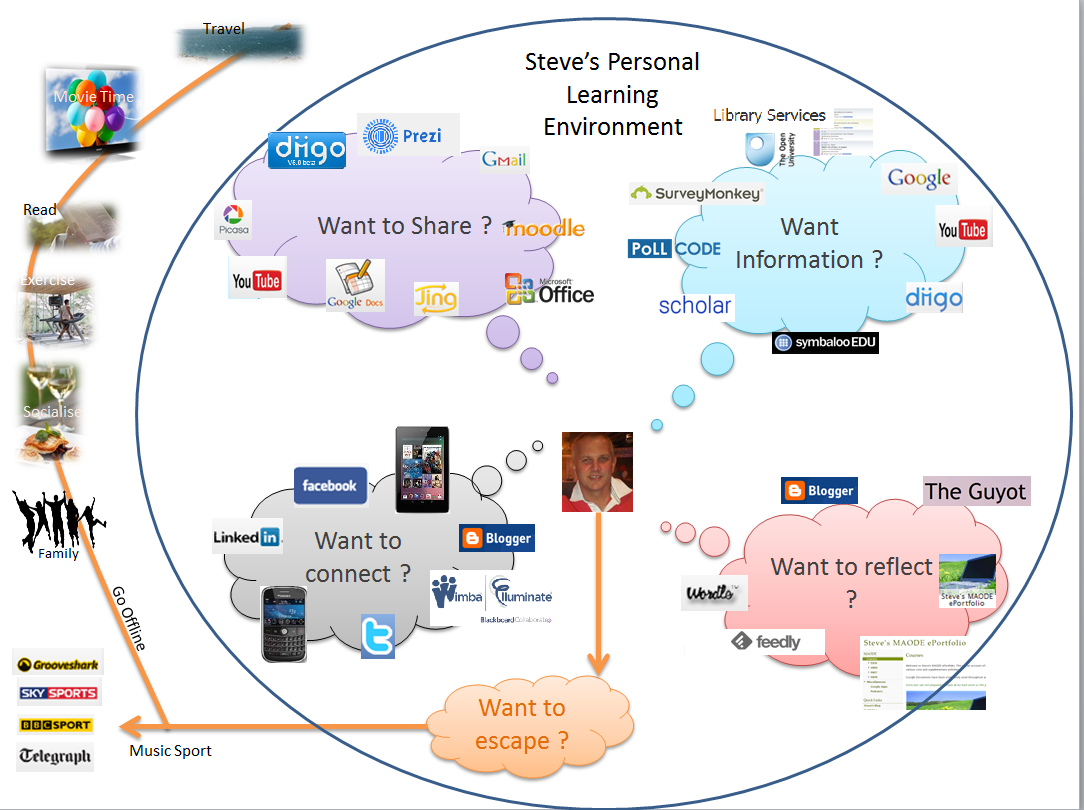
I thought it was worth revisiting my PLE to see how much has changed since I first completed my reflection on tools that I use on a regular basis. Back in 2011 my PLE looked like this. A few years down the road and its surprising how little has changed considering how fast things change on the internet. I guess this is because I choose tools that were effective from the off. Yes there have been some changes Google reader has gone being a significant change and I was quite annoyed to see Google also announce the end of  iGoogle leaving egg on my face.

However Feedly was an easy transition from Reader and Symbaloo just became more prominent as a bookmarking tool. An addition to my toybox is a Nexus and the use of evernote looks very promising. I have also experimented with publishing on YouTube and Elluminate/Blackboard collaborate is noew well embedded into my teaching and support of online learners.

I am also very please to have kept adding to my Diigo library it now has several hundred useful articles available through a search engine, its just a pity I didn't spend more time on the tagging to make them more consistent.

OK so here is my PLE Version 2


Saturday, 11 May 2013

Stuggling to bring the Innovation to the classroom

Introduction

Following a request from fellow teaching staff to give examples of how I use innovation within the classroom I thought I would put together an article that shows by example what  tools I have used. Those of you who know where I work will realise that many of these tools may well not work within our teaching environment. As ever the challenge is to overcome this. For now the best approach is to view this blog entry on the internet to get the best possible experience, then view whilst at work to see what we are up against. I am fortunate that I have internet access within the classroom which means all this technology works for me.

As I develop this I am testing the vaibility of using the various tools within 'Our' learning environment this is purely in the interest of supporting our learners and not an attempt to find work arounds on our system. The main tools covered in this article are:- 

1.0 Wordle
2.0 Jing
3.0 Video and the use of  YouTube
4.0 Plagiarism Tools
5.0 Diigo and Prezi
6.0 Adobe Presenter
7.0 Symbaloo
8.0 The Online Classroom
9.0 Bloggs
10.0 Eportfolios and Google Docs
11.0 Twitter
12.0 Online Surveys
13.0 Promethean Panels
14.0 Mind Genius
15.0 Putting it all together


One of the most important tools I use is 'Jing' this enables me to create a short (Max 5 Min) on screen video to aid learning. Lets start with a quick example of the use of Jing to show you how I use Wordle. Please note as you watch the following videos there is an option to maximise to full screen in the lower right hand corner of the player.

1.0 Wordle


Wordle is a tool for creating word clouds (Feinberg, 2013), great for revision aids or just to provide a different power point slide. No it won't work on our work LAN but nevertheless it is easy to get the created wordles onto the system http://www.wordle.net/ .


2.0 Jing

Jing gives you the basic tools to start sharing images and short videos of your computer screen. Snagit  is a more enhanced version of the tool.

The following video is taken from the support site where you will also find a number of additional help videos Capturing Video With Jing (Jing, 2013) gives an overview of using the tool to perform a screen capture, it is exactly how I will have demonstrated a number of the tools in this article.

Here are a few examples of how Jing has been used within the Controls Lab to support practical activities.
The first is a getting started tutorial for using a model in the lab to solve a problem.


The second is an example of how students have demonstrated the operation of their solution to a project. Here you can see the touch screen interfaced designed to support a water treatment process, this is an excellent way of providing evidence of learning.


3.0 Video and the use of  YouTube

We all know the benefits of providing videos to support learning, students sit up when a video is used and it inevitably generates a great deal of discussion. Over the years I have added a number of videos to my blog that is available to students. Of course videos don't come through the gateway at work but that should not stop us sharing this practice.

This quick example has been used to open up students eyes to the power of electronics in an effort to consider where technology is heading. 'A day made of glass' explores several concepts many of the systems you see in this video are already available.


As an educator I am sure you have seen 'Shift Happens', a video that went viral and generated a huge amount of discussion. This is an updated version that encourages us to rethink our teaching.

And if that gets you thinking then there are many other examples of thought provoking content online. I would also recommend looking at sites such as https://www.khanacademy.org/ and http://www.ted.com/


4.0 Plagiarism Tools

WCopyfind (The Plagiarism Resource Site, 2012) is a tool I have used for years it enables a quick check for plagiarism and copying of fellow students work. It is not as good as Turnitin (2013) but it is free and works well. The following Jing video demonstrates its use. The software is available at http://plagiarism.bloomfieldmedia.com/z-wordpress/software/wcopyfind/  but obviously this is for installation on your own system not the work network.

This short video gives a demonstration of how easy WCopyfind is to use.


5.0 Diigo

A must for any researcher this tools enables the fast bookmarking and highlighting of web pages. It really is a useful tool and if you go away from this blog and try just one tool out make it Diigo.  Part of my library can be seen if you click on this link. The more I look at Diigo the more I see its use students can share research links add annotation to web pages, highlight short sections. I can search my whole library for that article that I know I have read but I just can't find, and if you tag them properly it also helps. 


A quick power point presentation that gives an insight into using Diigo at work and a few screen shots is  available from this link which is a further example of using Google Docs.

Better still let Al Rowell (2011) demonstrate Diigo with the use of another excellent tool 'Prezi' which is a different way of making a presentation. However I would add a prezi presentation can take some time to produce.


6.0 Adobe Presenter


Adobe presenter is an add in for power point which enables the quick creation of a voice over as well as a nice front end viewer. The following is a quick example, make sure your speakers are on. You will also notice that the presentation is saved in a PDF file making it very transportable. If you right click on this link and download you will be able to view the presentation in full. It also serves to give some idea of how MCT Branch shares its data with students.

I have also added this to HTS LAN to show that it is possible to import and run this type of presentation.The link on HTS LAN is here. The presentation is a useful overview of MCT Branch's Digital Window, and how easy it is for our students to find support.

MCT Digital Window Presentation
Example of a presentation enhanced with Adobe Presenter.


7.0 Symbaloo

A favourite of mine as this works on the work network, symbaloo is not just a bookmarking tool it is an excellent way of organising a personal learning environment (PLE) all on one page this is how mine looks.


It is possible to have separate tabs for different environments and there are a number of further examples of additional web-mixes available on the site (Symbaloo, 2012). 

8.0 The Online Classroom

As a Tutor with the OU for many years I have had the luxury of being able to put many tools into practice. One such tool is the online classroom. I have held online discussions with students that have been all over the world in real time.  I will let the OU give a quick introduction to this tool (The Open University, 2012).

Screen view of an online classroom


9.0 Bloggs

In case you haven't noticed, this article has been posted on an online blog which is used as a resource to support my teaching (McGowan, 2013). A blog is an online journal but in this case I have designed it as a series of web pages and a number of useful links. Students find this particularly useful as a means of reading additional support material and further examples. This blog acts as a portal linking to a number of additional resources including the enhanced learning environment (ELE) and MCT Web which is only available internally at the college. As you will see I have been able to edit and add content to the blog from within HTS LAN this link takes you to a post that was created entirely on HTS and I plan to add to this to test the system and see what is possible.

Another blog  I use has developed over a number of years (TheGuyot, 2013), this has served as a method of reflection and personal development during a recently completed Masters Programme. In addition to this an e-portfolio was also required during the course which is touched on in the next section.

Two example Blogs that have developed over a number of years.

10.0 Eportfolios, Google Docs and Reader

The ability to store documents and research in the cloud has been particularly useful over the years. However the inability to access cloud based material has prevented its wider use within my teaching environment.  Below is my E-Portfolio created during my last few years of study. Naturally its content is restricted in some instances to prevent other students copying my work, which again gives an added advantage. This is my personal e-portfolio and I can choose what I want to share. It is based on Google Documents which have been linked together using Google Sites it really is quite easy once the documents have been produced.


https://sites.google.com/site/smcgh808/


I am a big fan of Google and the cloud applications because they work so well with my Nexus and my mobile phone. Google Reader and Google Calendar also work through the gateway at work so it is not all bad news. However as with any online tool you have to be aware that things can change, Google Reader is dying (Weiss,2013) and I am annoyed at this, so it is not all good news. So its goodbye Google Reader and hello Feedly the migration was easy (Feedly, 2013).

By way of a further example of how I utilise google docs is a pre-structured Google presentation which I expect students to populate over a number of lessons with evidence of learning. It is well received because it also includes searching for YouTube videos that demonstrate clear understanding of controls terminology.

Why not edit this presentation yourself click on this link to open the Presentation and add a slide to the end just see how easy it is just don't try and do it from HTS LAN.

Starting point for completing an online presentation.


 11.0 Twitter

The benefit of twitter is clear when researching or actively reading up on a subject. Yes for many twitter seems to have a bad reputation but let me just explain how I use it. I search looking for people that interest me and follow them. John Seeley Brown talks a lot of sense when it comes to education (@jseelybrown) and when he tweets they are usually worth reading.  Steve Wheeler (‏@timbuckteeth) a lecturer at Plymouth University, Steven Anderson (‏@web20classroom) are also both useful to me and Gordon Sparks (‏@SparksyOnRadio) sends me regular tweets during every game that Plymouth Argyle are playing in, sad I know but we all have our cross to bear.


So in actual fact I sit back and all the people I follow post very short messages to me each day on topics that I am interested in and it pops up on my phone. Needless to say I am not interested in the rest of the dribble that often goes on on twitter but like it or not it is here to stay and social networking is becoming very much a part of education for our younger students.

A snap shot of Twitter


12.0 Online Surveys

Really fast to setup and provides a quick way to collect information with a graphical output to share I have used several, Survey Monkey being one. This link is a survey that tries to ascertain current practices in online use from a group of practitioners why not complete it for me it would be helpful to gather an overall picture.
Please complete the Online Practice survey  Yes this will work on HTS LAN.


13.0 Promethean Panels

I have been using these panels for a number of years the following videos demonstrate their use. If you are at work it is available on HTS LAN and works well from this page which is presented in a web format (A very nice example even if I do say so myself).

I uploaded them to YouTube as well and this is the Introduction Video.


Further videos are available from the following links on YouTube
Using the FlipChart
Annotating over the desktop

Honestly if you haven't used the promethean panel in your classroom then you have been missing out, and so have your students.

14.0 Mindgenius

MindGenius is business mind mapping software that helps you capture, visualize and manage your ideas and information. This tool is now available on HTS LAN and we have a licence to install on our personal PCs as well.

MindGenius was designed specifically to meet business needs and this understanding comes across in every single piece of functionality, all added to assist with the common business processes that you face every day, from gathering ideas to managing projects and tasks or presenting to colleagues or clients.(Mindgenius, 2013).

15.0 Putting it all together

The following diagram is a representation of how all these tools come together and form a Personal Learning Environment and an overall teaching platform that has developed over many years.


Steve's Personal Learning Environment


16.0 Conclusion

I hope this article has shared my experience and given you ideas that you may want to use within your teaching and learning. There is a lot more that I want to add here but I have at least made a start. However let me finish on a very valid point, 'Get the pedagogy right first', if your lesson is rubbish out of date and dull, no amount of technology is going to improve it. 


References

Feedly (2013) Meet Feedly, a better reader [Online]. http://www.feedly.com/index.html (Accessed 11 April 2013).

Feinberg. J (2013)Wordle, A Tool for creating Clouds [Online].http://www.wordle.net/ (Accessed 21 March 2013).

Jing (2013) Jing Support Tutorials [Online]. http://www.techsmith.com/tutorial-jing.html (Accessed 21 March 2013).

MindGenius(2013)Mind Mapping Software [Online]. http://www.mindgenius.com (Accessed 11 April  2013).

McGowan, S. (2013)'Using Innovative Tools in Teaching and Learning', SLEC IT Electronics and Controls, March 2013 [Online] http://slecitec.blogspot.com/2013/03/using-innovative-tools-in-teaching-and.html (Accessed 23 March 2013).

Rowell, A. (2011) Save share and teach with Diigo [Online] http://prezi.com/uip0dfpokppm/save-share-and-teach-with-diigo/  (Accessed 04 April 2013).

Symbaloo (2013) Organise and share the best of the web with your students [Online] http://www.symbalooedu.com/ (Accessed 22 March 2013).

The Guyot (2013) 'A Personal Reflection, Using Innovative Tools in Teaching and Learning', Steve McGowan, March 2013 [Online] http://theguyot.blogspot.co.uk/ (Accessed 25 March 2013).

The Open University(2012) ‘Introducing Elluminate', Open University Library [Podcast]. Available at http://podcast.open.ac.uk/feeds/LibraryGuide/20120903T162738_Introducing_Elluminate.m4v (Accessed 22 March 2013).

The Plagiarism Resource Site (2012) WCopyfind Software and Instructions [Online] http://plagiarism.bloomfieldmedia.com/z-wordpress/software/wcopyfind/ (Accessed 23 March 2103).

Turnitin (2013) The global leader in plagiarism prevention and online grading [Online] http://turnitin.com/ (Accessed 20 March 2013)

Weiss, T.(2013) Former Google Reader Product Manager Critiques Reader Demise [Online] http://www.eweek.com/cloud/former-google-reader-product-manager-critiques-reader-demise/ (Accessed 11 April 2013).

Sunday, 30 September 2012

I eat humble pie

Original links to elearning tools page.

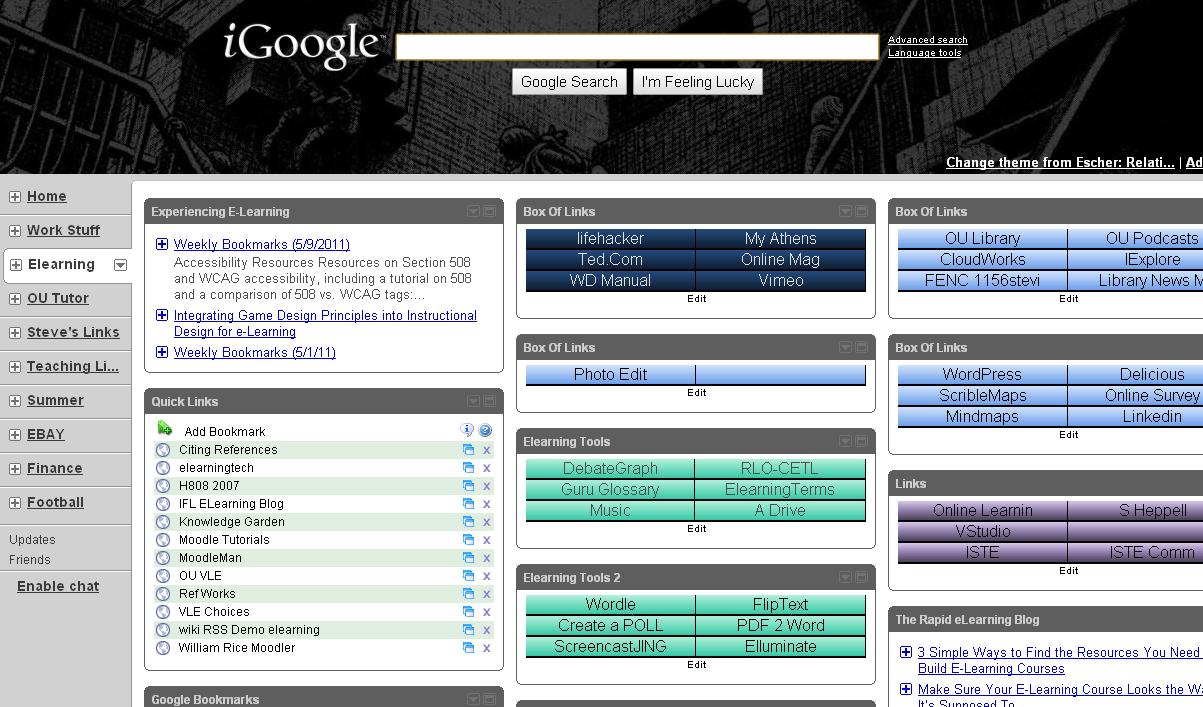
iGoogle is dying - I have spouted on about certain tools for a few years now and iGoogle has long been a favorite of mine. One web page that enables links to be stored and post-its to be formed. I posted my use of this to fellow students a while back and shared my homepage the advantages were clear to me as demonstrated to the right. Sadly though overnight the links app stopped working and although Google will not be shutting down the tool till next year it is already rendered useless because

iGoogle page rendered useless
developers have withdrawn and taken there apps with them this active page linking to a range of useful tools has been rendered to nothing more than a useless untidy web page. This is a draw back with working in the cloud you will always be reliant of the tools being available. and when this is not the case you are left in the dark. Good old Google - never mind I guess I will have to fall back to Symbaloo but it does make you think - whats next?

Wednesday, 11 May 2011

Just got to share this visual tool.

I currently add my shortcuts to learning tools etc on my iGoogle page the following pick will give the general idea.


But there is a useful alternative Symbaloo is a bookmarking service that creates visual bookmarks, lets you organize them and you can also share them. You can access your bookmarks from any computer.

 blogged the following addition information on this. A free account is available. For more features, you would have to sign up for one of the fee accounts.


As seen above in the Symbaloo Edu page, you can organize your bookmarks in different categories. The Symbaloo Edu page has lots of great links for teachers to use, organized by subject and topic.

SymbalooEdu can be used by teachers to create their own bookmark webmix for classes and for themselves. Students can use it to create bookmark webmixes for their classes.

There is also an EduTools page with links to lots of great resources, an educational news page, and a widgets page with calculator, stocks, tasklist, notepad, and more available to add into your webmix.

It is very useful for education and free.


Brought to my attention by  who posted most of this on his Blog but I wanted to make sure I had access to this later so apologies for the blatant copy but I am at least acknowledging you as the source.

Sunday, 8 May 2011

Technology in the classroom, 'An example'. Part 3

So why am I the only one using these panels then?

Well this is  not strictly true but since the implementation of panels across many classrooms in the college, why do I see them in use so little? In fact in some classrooms the position of the panel completely contradicts its use.

Here the panel is correctly positioned enabling the teacher to face the class the image is projected behind for all to see. But I have seen panels tucked away in the corner being used as mere computer screens facing away from students and in fact encouraging the teacher to talk whilst looking away from the students. So what barriers have been put up here by my colleagues

Training has been provided, tools and resources made available to prepare at their desks and a number of videos to help accelerate the learning yet still they are not used?

Reasons I hear for this range from:
  • I don't get on with them
  • I can't be bothered with this new technology stuff 
  • Whats wrong with my board work
  • I haven't got time for this
The list goes on. To say I am disappointed is an understatement, as far as I see it a small investment in time has reaped rewards in my classroom. 
  • The ability to print board notes and save several pages of board work to review at the end of the lesson or later on in the course.
  • Being able to prepare flipcharts in advance in little time at all.
  • Review lessons at a later date or indeed use an old flip chart as preparation for a new lesson.
  • Its actual fun too.
  • The list goes on
Talking to students, I am often asked why other lecturers don't use these facilities, what can I say? They are laggards who can't be bothered to spend a little time learning, they don't need to their board work is great, or make some other lame excuse. Well needless to say I remain professional but to be honest they are missing out as far as I am concerned  missing a good opportunity to improve the learning experience for the students.

Saturday, 5 February 2011

Habits and Habitats: Introducing the IDEA

I want a wall, where can I fit one in my classroom. Just been sidetracked by a tweet and took time out to view this. It goes on a bit but you'll get the idea fairly quickly. A flexible learning space and a wall for learners to share ideas. Sounds great !!
Want to learn more than
http://www.ryanbretag.com/blog/?p=2024

Tuesday, 30 March 2010

Just sharing an experience.

I was fortunate enough to be teaching at Surrey University on Saturday and I feel the need to share my experience, why you ask because I saw innovation in action and it worked, not the case at my workplace where every barrier possible is popped in the way.

I arrived at 10:00 for a two hour lecture/tutorial walked in to the lecture room armed with memory stick and prayed. I needn't have worried. I touched a touch panel picked the tools I needed, down came a projector screen, on came the projector, up purred the PC and we were in business. I logged on with the username and password that had been emailed to me, got a friendly welcome; it even knew my name and I was in business. I requested internet access and it was there and low and behold when I popped in my memory stick with a presentation and some notes on 'it worked'. I was in heaven I had arrived early because you just don't know what to expect but thanks Surrey I was impressed.

Back to work on Monday, I'll leave my keystick at home forget about using any video or web 2.0 apps as for Google apps, you're having a laugh. Such is life.

Saturday, 27 February 2010

Exploring Tangible Benefits of e-Learning:


The following is a summary of a number of case studies found when 'Exploring Tangible Benefits of e-Learning',JISC (2008). I have also tried to identify what is my opinion the main areas of innovation covered and the driving factors.
The case studies cover the following areas:-
  • Working together collaboratively
  • Innovative Online training 
  • Staff training to raise the profile and awareness of e-learning
  • Video conferencing sharing of modules across a number of universties.
  • Eportfolio system
  • Adoption of moodle
  • Blended approach to learning
  • Developing partnerships with local trusts 
  • Exams designed to support disabled students
  • VLE to support worldwide students
  • Online learning for eteaching practice
  • Podcasting to see real images instead of photographs
  • Blended approach to training use of moodle, podcasting and handset voting
  • Simulation gaming to help produce blended learning
  • Elearning resource for sharing best practice amongst staff
  • Website for the support of learning with wide ranging needs and support
  • Elearning to support paper based distance learning material
  • Virtual farm to enable collection of real time data
  • Eportfolios fro reflecting on teaching practice
  • Eportfolio to help support first year students
  • Course design to accommodate childcare arrangements 
  • Audio commentaries to accompany archaeology images
  • Creation of a virtual space for sharing elearning resources for staff 
  • Online assessment for medical staff reducing the assessment time required
In general the site offers examples of innovation that covers the following areas:-
  • e-assessment
  • Online learning
  • Eportfolios
  • Collaborative working
  • Podcasting
  • Gaming and virtual simulations
The driving factors apparent from these case studies include:-
  • Improving the learner experience
  • Developing staff effectively 
  • Sharing best practice as both a student and staff level
  • Performing assessment more efficiently
  • Provision of support material for all areas of academic work
JISC (2008) Exploring Tangible Benefits of e-Learning: Does Investment Yield Interest? [online],
http://www.jiscinfonet.ac.uk/publications/publications/info/tangible-benefits-publication (Accessed 12 November 2009).

A quick Reflection, Plenty of innovation this week.

Another busy week in the classroom, started with my OU Tutorial, six students helped to make it a worthwhile event and the disappointment within the group with respect to the location of the next tutorial led me to produce an online poll. I won't post it here because I don't want any extra votes:-) that I am not expecting.
With 26 students seven days after the poll only 12 have answered which is disappointing, it’s only a 10 second task. Here I am considering moving my tutorial to suite the students and many haven’t even responded. I have also produced a Google map showing all there locations to help me identify groups for the next activity another innovative idea thanks to Google.
Most of my working week was spent teaching the only rest bite was a Technical visit to Mitsubishi UK on Friday, where an update on the latest technology in controls was experienced. What’s this got to do with H807 I may well ask, well innovation is all around my life and the sharing of ideas and concepts within the tutor group is both invigorating and rewarding. I wish I had more time to follow up some of the discussions I know now I should be completing the TMA as I go along but I intend to reflect on this during the week and go back over some of the discussions.
The week ahead sees my students complete a practical controls project using all the latest technology I will experience innovation in practice this week, its always interesting to see how as a group they approach this they should divide the work up programming the controllers, touch screens and SCADA system to make the solution but I bet they don’t.
In addition to this a few of my colleagues are finally starting to show an interest in the VLE so I might strike while the irons hot.

Saturday, 20 February 2010

e-Assessment in Medicine and Veterinary Medicine, University of Edinburgh

http://www.jiscinfonet.ac.uk/case-studies/tangible/edinburgh/index_html
University of Edinburgh, e-Assessment in Medicine and Veterinary Medicine

The Online System for Clinical Assessment was developed in-house by the College of Medicine and Veterinary Medicine's Learning Technology Section to support the delivery of online assessments in the undergraduate medical degree programme and undergraduate veterinary degree programmes. Objective, Structured, Clinical Examinations are an essential component of assessments for medical and veterinary students.

The system was used to replace the labour intensive testing methods already in place and also to speed up the assessment process.Some of the Clinical Examination would be replaced by assessments, testing the same competencies/skills but delivered in a secure technological environment requiring no staff support thus enabling all students to be examined in two sittings over a single day instead of two days.

This innovative approach would enable electronic marking, a greater variety of scenarios yet still test the competencies and skills required.

The Learning Lab staff development initiative Swansea University

http://www.jiscinfonet.ac.uk/case-studies/tangible/swansea/index_html
Swansea University, The Learning Lab staff development initiative

Summary
The Learning Lab is an informal collaboration between schools and departments on all aspects of e-learning. A forum to discuss, formulate and disseminate ideas and best practice and an area where learning and teaching rather than technology drive the process.The plan was to learn by actually performing a number of e-learning tasks; a hands on approach.

The learning lab is a website of shared resources and information to help support the University in engadging staff in participation and self learning. Sharing of best practice and ideas because a number of staff had very little idea when it came to using the tools or indeed understanding what e-learning was actually about.

By allowing staff to use and explore the use of the tools it was hoped that they would be able to identify the benefit to their classes where appropriate and start using some of the tools. However the Learning Lab site is a community and where everyone had an opportunity to partake, there was to be no dictation by 'Learning Technologists'.

A team-based approach to developing e-resource at Warwick

http://www.jiscinfonet.ac.uk/case-studies/tangible/warwick/index_html
The University of Warwick, A team-based approach to developing e-resource

Summary

The aim was to introduce a planned approached to the development of elearning resources that would gradually develop rather than leave it to a few enthusiastic but isolated individuals.

It involved a number of planned activities designed to promote understanding and share best practice. It took the form of online support, face to face sessions and hands on training in the ICT suite.

Staff were encouraged to attend a number of sessions lured by the free hot lunch and invited to share ideas and suggest future activities

The innovation with this case was the fact that innovation was being used to sell innovative ideas and encourage the adoption of new practices and facilities. By learning about the e-resources in a combination of events it was hoped that staff could see and indeed embrace the benefits. This case did highlight the fact the staff lacked confidence in the use of the the tools available and the online conferencing.

Formative e-assessment in Economics at Derby


http://www.jiscinfonet.ac.uk/case-studies/tangible/derby/index_html
University of Derby, Formative e-assessment in Economics

Summary
The purpose of this innovation was to support private study with the aim of reducing failure rates on the micro-economics first year module.

The idea was to put in place a number of formative e-assessments available to the students so they could be completed in addition to the lectures and tutorials. By putting these assessments in place and allowing students to take them multiple times it was expected that the students would be able to address common areas that were found to be a problem on previous courses.

The courses were already using a VLE and this was just an additional component. However to ensure that students actually completed them a support and follow up mechanism was put in place. This enabled the identification of students that needed additional support early on in the course.

 A slight problem was that of connectivity; the e-assessments could only be accessed on campus  through the network and were not available outside of the campus. Part of the reason for this was the file size, in fact initially it was found that many of the PCs on site were not up to specification.

Innovative

In terms of innovation, e-assessment is common place now it does enable repeat tests and students to self help. In the case of this study the assessments have been designed in house therefore cost effective and the case study emphasises the fact that the tests have been designed with extensive feedback loops therefore supporting the natural progression of the student.

Tuesday, 16 February 2010

Case Study Investigations


By exploring the JISC website it is planned to perform a review of four case studies looking at the background information about the approach taken. My blog will be used to record my views and share with fellow H807ers. For each case study that I consider, I will add a blog entry. I start today by listing my selected case studies.

http://www.jiscinfonet.ac.uk/case-studies/tangible/derby/index_html
University of Derby, Formative e-assessment in Economics
  http://www.jiscinfonet.ac.uk/case-studies/tangible/warwick/index_html1
The University of Warwick, A team-based approach to developing e-resource

http://www.jiscinfonet.ac.uk/case-studies/tangible/swansea/index_html2
Swansea University, The Learning Lab staff development initiative

http://www.jiscinfonet.ac.uk/case-studies/tangible/edinburgh/index_html
University of Edinburgh, e-Assessment in Medicine and Veterinary Medicine

Saturday, 13 February 2010

What is Innovation.


My experience within the area of teaching is where I would like to focus on this area, what have I experienced that is innovative over the past 15 years.
The introduction of many learning technologies that have included:-

  •     Powerpoint and multimedia
  •     Social communications 
  •     Touch screen interfaces and whiteboards
  •     Electronic testing and marking
  •     3D virtual worlds and graphics    
I guess for me innovation means using modern technologies in the classroom for the better of the student learning experience. If you get it right there is a certain buzz in the classroom and good results naturally follow.
Rich, M. and Holtham, C. (2005). The innovation was taking what was a new technology and adding it to the general makeup of the course. The use of email within a face to face training environment, can you believe this was seen as innovation now its taken for granted that email is available when learning.
Lück, M. and Laurence, G.M. (2005).The addition of video conferencing was technically more challenging and indeed even now it creates challenges for students and their systems there is a such a wide range of platforms and limitations as a result make it inevitable that some learners will not be able to see videos easily. In this example it was seen as a change and valuable addition to the course and certainly seen by students as a useful addition to the course. It was mean't to enhance F2F not replace it.
Generally innovation brings increased productivity and with it increased profits, this is not always the case but it is safe to say that innovation generates interest albeit in some cases only for a short time. It is important that new ideas are generated and experimented with after all many technological leaps have come about because the ideas of an individual have been shared and developed by someone else.


I teach in a College my students are being paid to be there and generally want to be there. Yes a strange but true notion. I have a captive audience but students of today want more and want to do less. They don't see the point of exams, would prefer to do an assignment or project, they struggle to see the need to memorise something that is just a few clicks away.
I see innovation in my place of work as trying to embrace the modern student and improve the learning experience but I am surrounded by some dinasours who still think that using a 10 year old viewfoil is acceptable. Over the years I have developed web sites and supportive material to help the students but let me share a frustration with you.
I spent ten years developing a DVD with all my lessons on and resources which I used to issue students the content is in web format and therefore accessible I have been working in the cloud for years too. Due to security measures put in place all PCs in the college are now locked down, no USB access no DVDs and the internet is filtered to stop me having access to web 2.0 apps and 'Cloud Working', The college put in place a Moodle VLE and have basically left use to get on with it. No training, no guidance and so I now have to consider moving all my lessons into this environment.
Whilst I welcome Innovation, its needs to be considered as part of the whole picture. I am certainly an activist trying to address this issue but in the meantime its all a bit frustrating.


Reflection 
Reading what most contributors made of this theme it was clear the most thought that innovation is good it as long at it improves the learning experience. Time is seen as the enemy many educators are already overburdened with bureaucracy and forms and just do not have the time to implement new ideas. It is not until demonstrations of the real benefits are seen that the additional effort can be seen as worthwhile.
We live in an innovative world the transistor was invented just over fifty years ago and all this technology has come about as a result, scary, its no wonder some cannot keep pace with the developments let alone any new innovations as they come along.
There is also a clear goal for an educator, 'educate', 'inspire' and 'enthuse' the student, enable their creativity and help them find what they aspire to. Can this be possible without innovation, of course, as has been pointed out many talented teachers can inspire their class with good teaching and many talented innovators can overdo the the technology at the expense of the teaching.

References

Lück, M. and Laurence, G.M. (2005) ‘Innovative teaching: sharing expertise through videoconferencing’, Innovate, vol.2, no.1 [online]http://innovateonline.info/index.php?view=article&id=59 (Accessed 6 November 2007).
Rich, M. and Holtham, C. (2005) ‘New technology in learning: a decade’s experience in a business school’, British Journal of Educational Technology – Special Issue on Innovation in Elearning, vol.36, no.4, pp.677–679; also available online athttp://libezproxy.open.ac.uk/login?url=http://dx.doi.org/10.1111/j.1467-8535.2005.00545.x (Accessed 6 November 2007).